Product interface templateSecurity · Authentication

Zero-Trust Authentication React Template

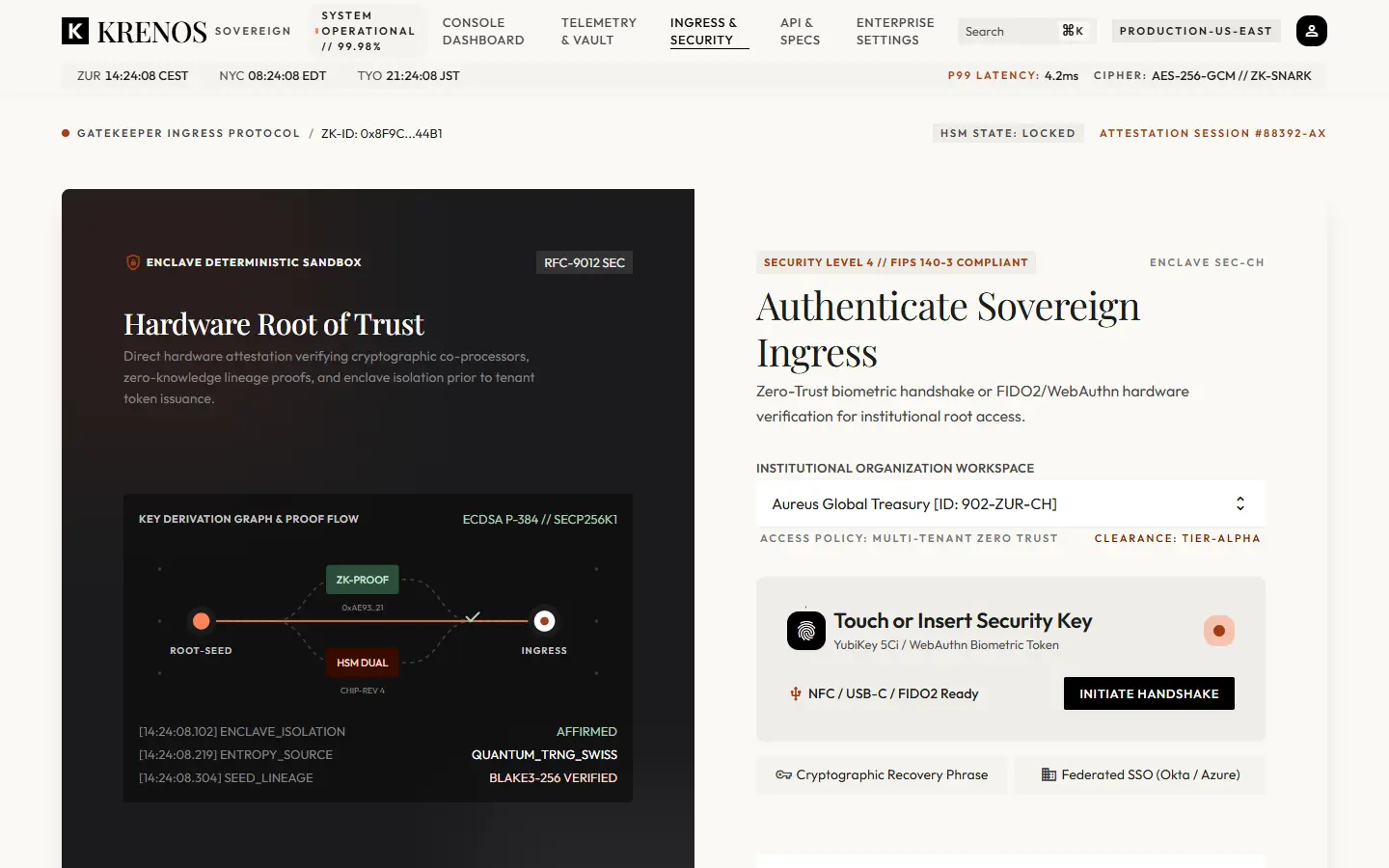
A hardware-key sign-in interface with live verification states — the screen a security product shows before anything else.
Template
Zero-Trust Ingress
Type
Product interface
In kit
08 / 11
Zero-Trust Ingress template: a dark root-of-trust panel beside a hardware key sign-in form.
Zero-Trust Ingress — a 1440×900 snapshot of the live template. Hardware-key sign-in flow with live verification states.Preview on devices: Zero-Trust Ingress
02Overview

What the Zero-Trust Authentication React Template gives you.

Zero-Trust Ingress is the KRENOS zero-trust authentication React template. It covers the sign-in surface that most kits skip: a hardware-key ceremony with real intermediate states, an attestation panel and a workspace selector.

The ceremony runs through idle, waiting, verifying and authenticated, so every state you need to design for — including the waiting one — already exists as markup you can style.

03Key features

Built around what this template actually does.

  • 01

    FIDO2 state machine

    A four-phase hardware-key ceremony with a scan status region that announces changes to assistive technology.

  • 02

    Root-of-trust panel

    A dark panel describing key derivation from root seed through a zero-knowledge proof and a dual-chip module to verified ingress, as an accessible diagram.

  • 03

    Security ring

    A progress ring that tracks the ceremony phase and settles when verification completes.

  • 04

    Workspace selection and attestation

    A workspace picker plus a host-environment integrity attestation list.

04What's inside

5 sections, in page order.

Every one is a working part of the live template, not a screenshot. Open the demo to use them.

  1. 01

    Root of trust

    The derivation-path diagram and assurance copy.

  2. 02

    Sign-in panel

    The hardware-key form with its phase-driven prompt.

  3. 03

    Key scan status

    A polite live region reporting ceremony progress.

  4. 04

    Workspace select

    Choosing the destination tenant.

  5. 05

    Host attestation

    Environment integrity checks listed for the operator.

05Who it's for

Products this direction suits.

Security and identity products

Passwordless, WebAuthn and hardware-key authentication flows.

Enterprise applications

Sign-in for products where the login screen must communicate assurance.

Internal platform access

Operator and administrator entry points into regulated systems.

06Technology & customization

The stack underneath.

  • The ceremony is a typed state machine in `useHardwareAuth.ts`
  • Status changes announced without trapping live values in a live region
  • No credentials are handled, stored or transmitted
  • Strict TypeScript, keyboard-operable throughout

What you can change

  • Replace the simulated ceremony with real WebAuthn calls in one hook.
  • Re-label workspaces and attestation lines from typed data.
  • The dark panel inherits the shared inverse-surface tokens.
  • Phases can be extended without touching the presentation.

Frontend only

No authentication, credential storage or identity provider is included. The ceremony is simulated in a hook, and no key material is ever read by the kit.

07Questions

Frequently asked.

No. It is frontend-only. The hardware-key ceremony is simulated in `useHardwareAuth.ts`, and the kit never handles or stores credentials.

Fetch a challenge from your server, call `navigator.credentials.get()` during the waiting phase, post the assertion back for verification, then set the authenticated phase from your server’s answer. The ring and status follow automatically.

Yes. Waiting and verifying are fully designed states, not spinners — which is usually the hardest part of building a sign-in screen.

It is commonly paired with the IAM governance interface for administration and the security dashboard for key material.

KRENOS · Zero-Trust Ingress

See it running. Then make it yours.

The demo is the real template, not a video. It opens with a thin KRENOS bar so you can switch templates, preview it at phone, tablet and desktop widths, or come back to the explorer.